Your clients ask about ChatGPT. You answer it by hand.
Open ChatGPT, read the analytics, write it up, rebuild the document — every month, for every client. SimplyReport takes the GA4 and Search Console half off you: the data pulled, the analysis drafted, and one branded report your client opens with a link.
Organic search grew 15.0% against the previous period, to 6,230 sessions. "fresh roasted coffee online" moved from position 11.8 to 7.1, and its clicks grew 11.1%. The dip on March 14 lines up with the Google March core update — worth monitoring but no action needed yet.
Illustrative data. Acme Coffee Co. is not a real client.
Free tools, no account.
Run them before you send a proposal.
AI crawler access
Whether the bots behind AI answers can actually reach a site — and what is blocking them.
Check a domain →JavaScript rendering check
What a fetch that does not execute JavaScript receives from a URL, as any of the published crawler user-agents.
Fetch a URL →AI traffic blind spot
The GA4 setup that reveals AI assistant traffic you are currently filing as Direct.
Get the configuration →Content Credentials viewer
What the signed provenance record inside an image says — who signed it, and whether that signature still holds.
Open a file →
They cost nothing to run and require nothing from you — no account, no email, no cookies.
I spend 3 hours every Monday screenshotting GA4 into Google Slides for 7 clients. If this actually works, it would save me an entire day every month.
Solo SEO consultant — customer interview
Two of these you already have connected
Solo consultants are getting asked “how do we show up in ChatGPT?” and have no reporting answer. Part of one now exists in the two connectors this product runs on — Google put AI data into both — and each arrives with a real limit attached.
- Search ConsoleAdded June 2026
Generative AI performance is broken out in Search Console's own reporting.
The limit: Impressions only — no clicks and no position — so it tells you that you were shown, not what it was worth.
- GA4Added May 2026
A native AI Assistants channel, so sessions from AI tools stop landing in Direct.
The limit: It does not cover every assistant — Perplexity is absent from Google's list, and AI Overviews is excluded because it isn't a referral at all.
Reading these two into the report is the first thing being built — and the data is already there, in your own Search Console and GA4, today.
Nobody compares two months of queries by hand
Pasting this month’s numbers into a chat window gets you a description of this month. The comparison — which queries climbed, which dropped, which appeared and which vanished since the period before — is a separate job, and by hand it means exporting two periods and reconciling two lists of queries row by row. So it tends not to happen, and the report ends up saying what the number is rather than why it moved. SimplyReport runs that comparison against the previous period of equal length and writes about what actually moved.
“Organic search grew 15.0% against the previous period, to 6,230 sessions. "fresh roasted coffee online" moved from position 11.8 to 7.1, and its clicks grew 11.1%. The dip on March 14 lines up with the Google March core update — worth monitoring but no action needed yet.”
What it writes, from period-over-period history. Illustrative data. Acme Coffee Co. is not a real client.
Here’s what that looks like in SimplyReport
Screenshot of the app running on demo data. The clients in it are fixtures, not real accounts.
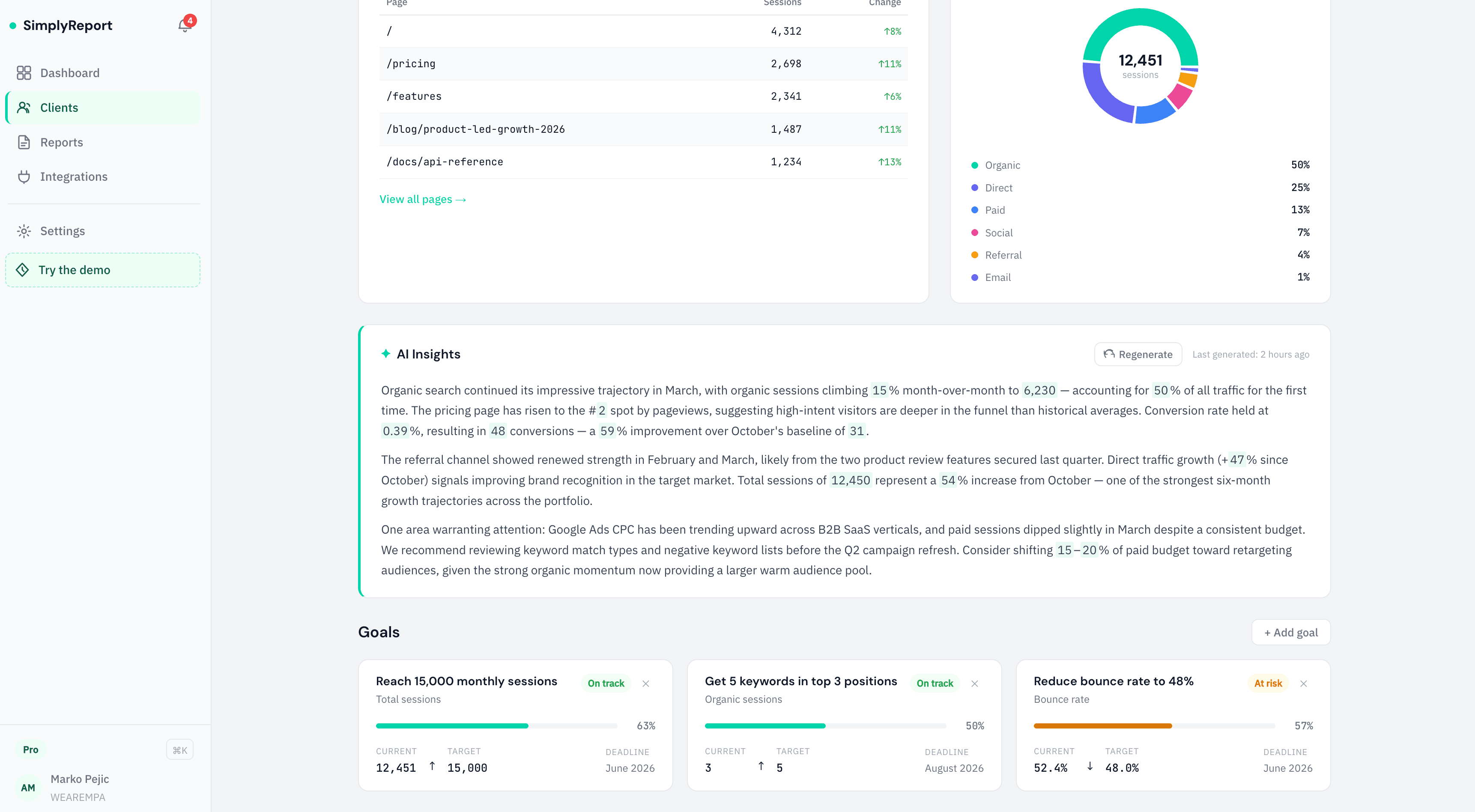
That is one panel of it. The whole report your client opens is at /sample — the same illustrative figures, end to end, with the consultant annotations you can toggle on.
Built for how SEO consultants actually work
Not another complex dashboard. A focused tool that turns your data into reports your clients love.
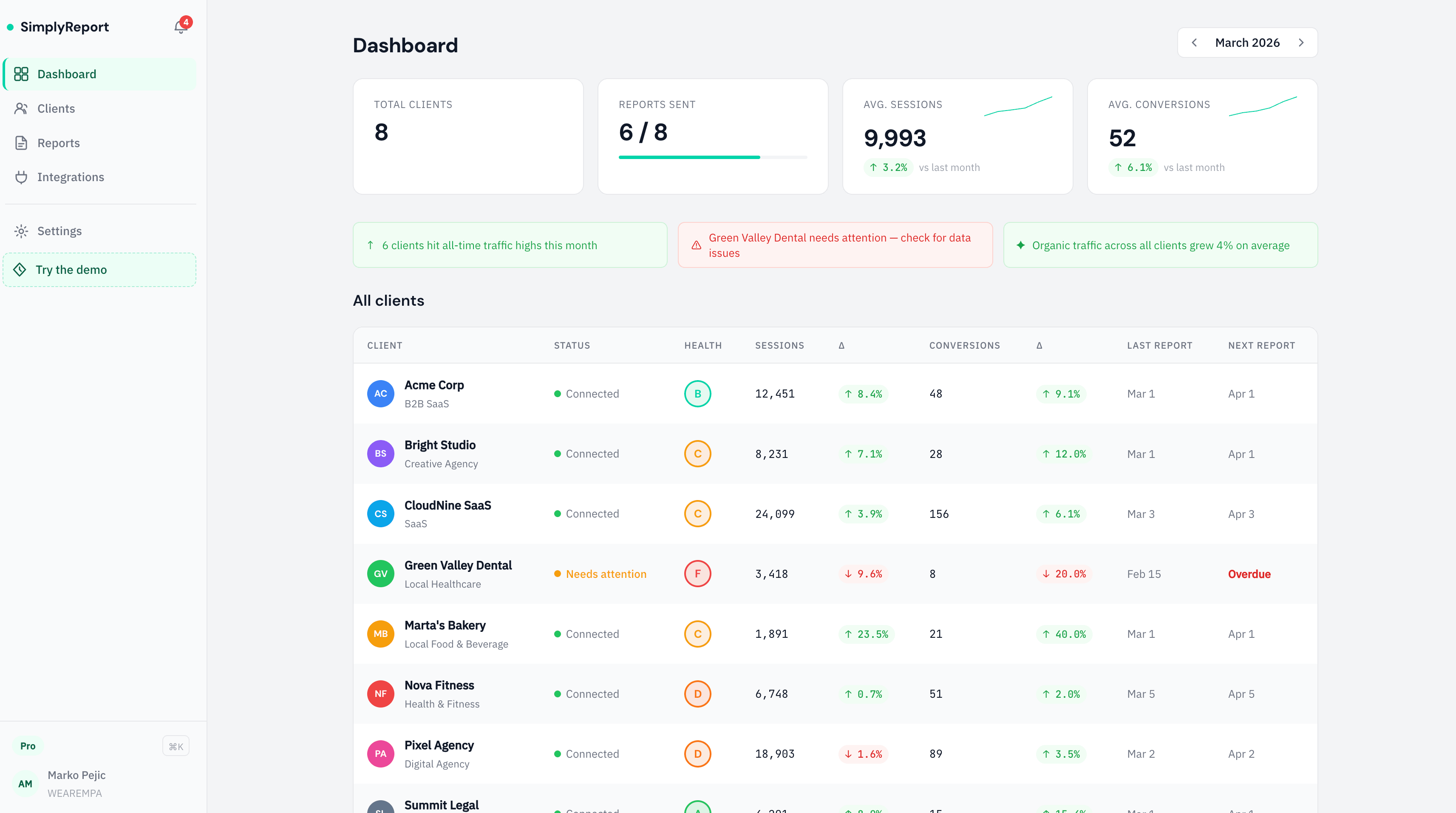
Screenshot of the app running on demo data. The clients shown are fixtures, not real accounts.
DASHBOARD
Every client, one glance
One row per client, with the period's sessions and conversions and how they moved against the period before. The scoring, alerting and report-status columns in this screenshot run on demo fixtures today, not on your account.
Screenshot of the app running on demo data. The clients shown are fixtures, not real accounts.
AI INSIGHTS
Analysis that sounds like you wrote it
Our AI reads your data and writes specific, actionable analysis — referencing real numbers, identifying causes, and suggesting next steps. Not generic 'traffic went up' filler.
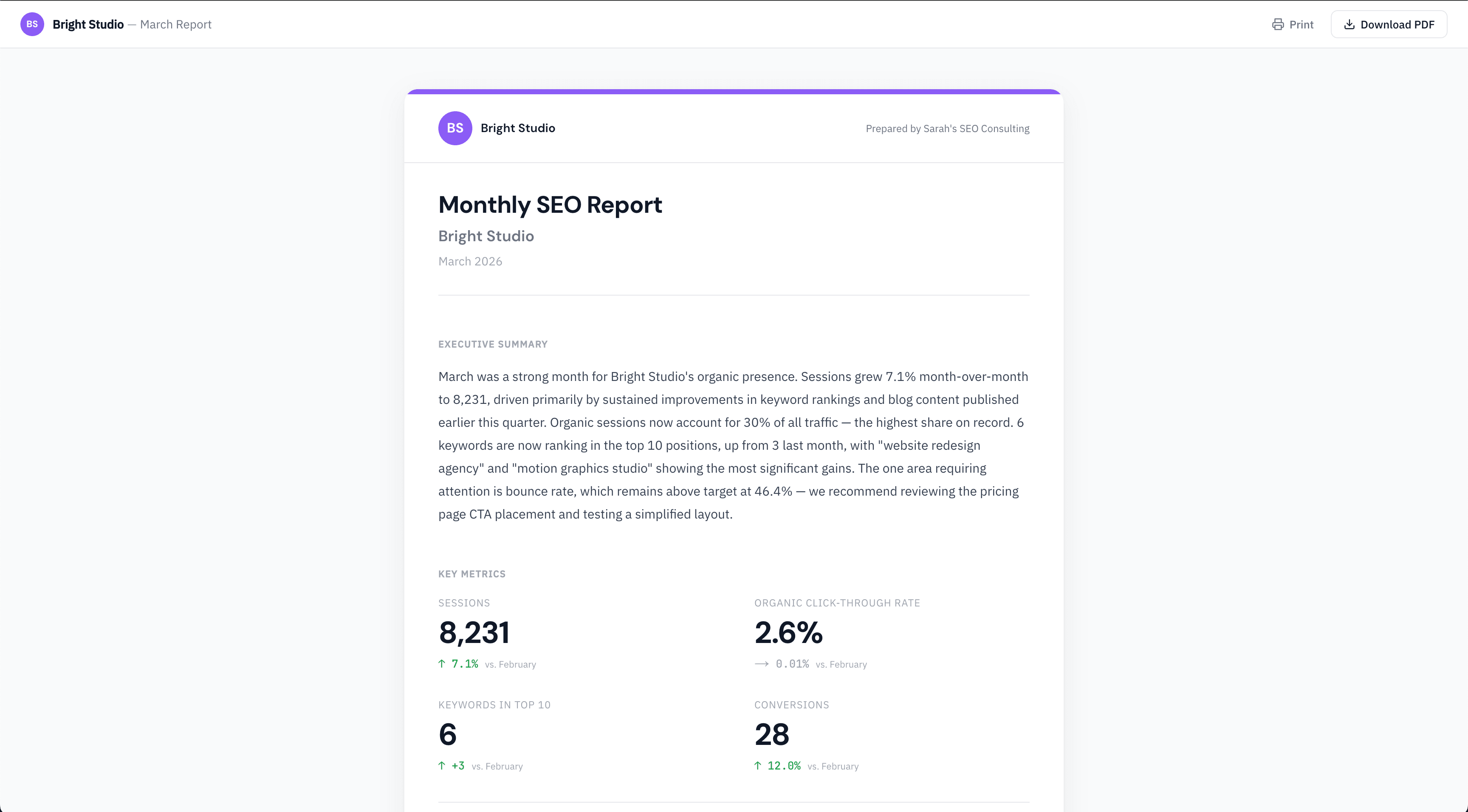
Screenshot of the app running on demo data. The clients shown are fixtures, not real accounts.
CLIENT REPORTS
Reports your clients actually read
Clean and readable. Your clients get a link — no login required. Executive summary, key metrics, traffic trends, and action items. Everything they need, nothing they don't.
The analysis is written per language, not translated
The prompts behind the analysis are written separately in each language — not run through a translator. The excerpt below is what the Serbian one produces.
Choosing a language per client is not wired up yet: every report generates in English today.
✦ AI ANALYSIS
Organic search grew 15.0% against the previous period, to 6,230 sessions. "fresh roasted coffee online" moved from position 11.8 to 7.1, and its clicks grew 11.1%. The dip on March 14 lines up with the Google March core update — worth monitoring but no action needed yet.
Illustrative data. Acme Coffee Co. is not a real client.
More languages based on user demand. Want German, Spanish, or another? Tell us when you join.
The 5-minute setup
- 01
Connect your data
Securely authenticate GA4 and Search Console in two clicks. No API keys, no spreadsheets.
- 02
Pick a template
Start with the SEO Performance template — it already knows which metrics matter. Add your logo and brand colors.
- 03
Send one link
Generate the report and send your client a link. No account for them, nothing to install.
Without SimplyReport
- Exporting GA4 and Search Console, one client at a time
- Pasting the numbers into a chat window and checking it read the columns right
- Editing the answer back into something that sounds like you wrote it
- Rebuilding the same document, every month, for every client
- The "Monday Scramble" to finish reporting
With SimplyReport
“Organic search grew 15.0% against the previous period, to 6,230 sessions. "fresh roasted coffee online" moved from position 11.8 to 7.1, and its clicks grew 11.1%. The dip on March 14 lines up with the Google March core update — worth monitoring but no action needed yet.”
Illustrative data. Acme Coffee Co. is not a real client.
- Written up for you, not just charted
- Clients don't need an account
- One link, not an attachment
Simple pricing for every scale
FREE
- Clients1
- Data sourcesGA4
- AI analysisNone
SOLO
or $24/mo billed annually
- Clients5
- Data sourcesGA4 + GSC
- AI analysisIncluded
PRO
Most popularor $49/mo billed annually
- Clients20
- Data sourcesGA4 + GSC
- AI analysisUnlimited
AGENCY
or $108/mo billed annually
- ClientsUnlimited
- Data sourcesGA4 + GSC
- AI analysisUnlimited
Solo is $29/mo for 5 clients. The two data sources are Google Analytics 4 and Google Search Console; there is no third connector.
These are the app’s plans. It is in closed beta, so nothing here is billable yet — the buttons join the waitlist. The free tools above are a separate thing and are not part of any plan.
AI visibility tracking is not part of any plan above. Every check is a live query against a paid API, so when it ships it will be metered per check rather than included in a subscription. There is no price for it yet.
What is shipped, what is built but not running, and what is planned — one page, no dates, because a date is a claim too.
How this compares to what you are probably using — every figure on those pages links to the vendor’s own page and carries the date we read it.
No paid testimonials. No fake numbers.
SimplyReport probably isn’t for you if…
- You manage 50+ clients and need rule-based custom reporting (use Whatagraph or AgencyAnalytics enterprise)
- You need PPC, Meta Ads, and LinkedIn campaigns in the same dashboard (we focus on SEO — GA4 + Search Console only)
- You don't have GA4 or Search Console set up for your clients (you'll need access to those to use SimplyReport)
- You need AI search tracking today (we track nothing yet — Profound and Peec do it at depth, and AgencyAnalytics sells it as an add-on next to the reporting you already have)
Still here? Good. You’re who we built this for.
Questions you might have
I already use GA4 + ChatGPT. Why do I need this?
You can keep doing that — it works, which is why most people reading this already do it. The cost is that none of it carries over. Every month you pull the GA4 export, pull Search Console, paste both into a chat window, check the model has not misread a column, edit the answer into your own voice, and rebuild the document again for each client. SimplyReport does the pull from accounts you connect once, writes the first draft against the previous period, and puts it in a branded report your client opens with a link — so the month's work is editing rather than assembling. The judgement stays yours. The retyping does not.
How is this different from GA4 directly?
GA4 is a data warehouse. SimplyReport is a storyteller. We translate GA4's complex UI into a clear analysis that focuses on outcomes, not just metrics.
Why not just use AgencyAnalytics?
AgencyAnalytics is great for dashboards. We are built for reports. We focus on the qualitative analysis — actually explaining the 'why' — instead of just showing another chart. If you need rank tracking, site audits and dozens of ad integrations, they will serve you better than we will.
Do you track AI search visibility yet?
No. It is the half we are building and it is not measuring anything today — nothing in SimplyReport queries ChatGPT or Perplexity, and no brand mention has been counted. What is real right now is that Google put AI data into both connectors this product already reads: Search Console breaks out generative AI performance (impressions only), and GA4 has a native AI Assistants channel (which excludes AI Overviews, and does not list Perplexity). Reading those into the report is the first piece of work.
Which AI platforms will you track?
ChatGPT and Perplexity first, then Google AI Overviews. None of them are being sampled yet. When it runs it will be sampled and reported as a directional signal, not a precise score — and we would rather say that up front than dress a sample up as a metric.
Is the AI analysis generic?
No. It compares the period against the previous period of equal length and picks out what actually moved — queries that climbed, queries that dropped, ones that appeared and ones that vanished — then writes about those. It is one period-over-period comparison rather than a reading of the client's whole history, but it is the difference between commentary that says why something moved and commentary that restates the number.
Do my clients need an account?
No. You send them a link and they open the report in a browser — no login. Reports emailing themselves on a schedule is planned and not built, so today sending the link is your step, and every report carries our name in the footer rather than yours.
Spend your Mondays on strategy, not screenshots.
NO CREDIT CARD REQUIRED • CANCEL ANYTIME